Claude Cowork habit: the 10-minute daily routine that sticks
By Riz Pabani on 01-Dec-2026
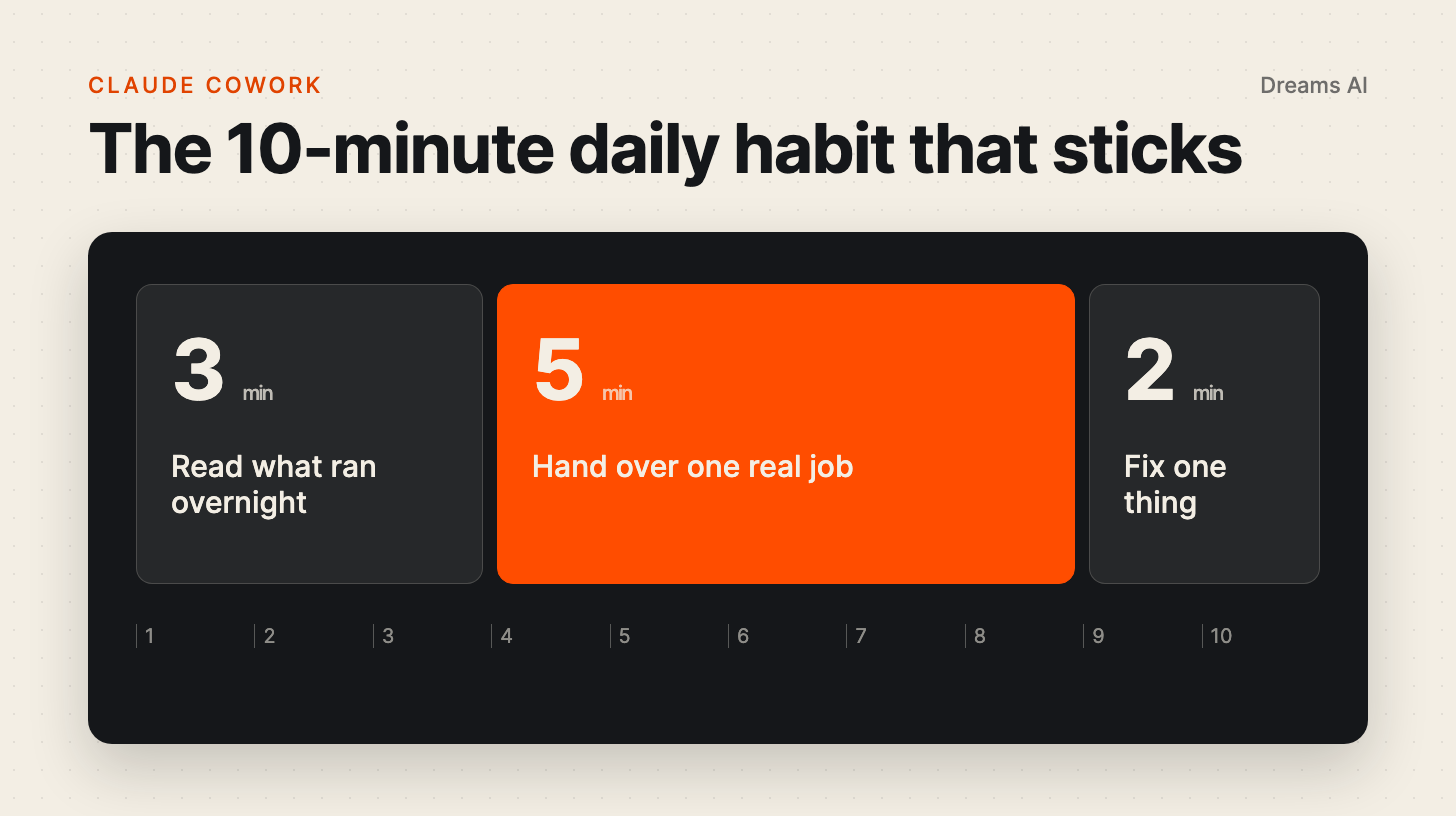
The Claude Cowork habit that sticks is ten minutes a day, at the same time, in three parts: read what your scheduled tasks did overnight (3 minutes), hand Cowork one real job from today's list (5 minutes), and fix one thing in a prompt or skill that annoyed you (2 minutes). Tie it to something you already do, like your first coffee, and expect it to take a couple of months to feel automatic, not a week.
Most people I train forget Cowork is there. They set it up, love it for four days, then a busy Tuesday happens and it's back to doing everything by hand.
Want this routine built around your own week, on your own laptop? That's what my 90-minute 1-2-1 is for. See how a Cowork session works
Why Cowork doesn't stick on its own
Cowork waits for you. A chatbot is the same: if you don't open it, nothing happens. So the tool ends up competing with your inbox for attention, and the inbox wins.
The fix is to give it a slot in your day and something already waiting for you when you get there. That second part is now easy. Scheduled tasks run remotely, "even when your computer is asleep or the Claude Desktop app is closed" (Claude Help Center). They're on every paid plan: Pro, Max, Ultra, Team and Enterprise (same source).
So when you sit down, there's already a briefing, a summary or a sorted folder to look at. You're not starting from a blank box.
For me it was a morning news briefing. I used to spend 20 minutes scrolling feeds. Now I read one document over coffee.
These days a few more things run on a schedule. One refreshes my to-do list every day. Another reviews my week every Friday and looks for jobs I could automate.
The 10-minute routine
Minutes 1 to 3: read what ran overnight
Click "Scheduled" in the left sidebar. You can see upcoming and past runs there (Claude Help Center). Open last night's outputs and skim them.
If you don't have a scheduled task yet, set one up first. A daily news briefing is the easiest start, and I've written up exactly how I built mine in 30 minutes. The help centre lists other good ones: a summary of the last 24 hours of email or calendar, a weekly report from your spreadsheets, or tidying a folder (same source).
Minutes 4 to 8: hand over one real job
Look at today's to-do list and pick one thing Cowork could do a first pass on. Not a test. A real job you'd otherwise do yourself today.
Good first picks:
- Turn yesterday's meeting notes into a follow-up email for you to check
- Pull the numbers out of three attachments into one table
- Draft the reply to the email you've been avoiding
Start the task, then go and do something else. Come back when it's done.
This is the step people skip, and it's the one that builds the habit. Reading outputs is passive. Handing over work is what changes how your day runs.
The one I hand over most is email. I tell Cowork to draft a reply to the last email from someone, "polite but firm, declining the timeline". It reads the thread, writes the draft in my tone and saves it to Gmail Drafts. I review it and hit send. That used to be 15 minutes of context-switching. Now it's about two.
Minutes 9 to 10: fix one thing
Something in the last 24 hours annoyed you. The briefing had an old story. The email draft was too formal. The table missed a column.
Open that scheduled task or skill and add one line that fixes it. One line, not a rewrite.
I do this with my own instructions file. Every time Claude does something I don't like, I add a line. "Always check the banned phrases list before submitting a draft" is one of them. I added about 20 in my first four months, and the first draft is now usually close to publishable. My blog-writing skill is on its fourth version for the same reason. If the fix is something you'll want in other tasks too, turn it into a skill (how I create Cowork skills).
Why ten minutes and not an hour
Because you'll do ten minutes on a bad day. An hour gets skipped.
The best-known study on this, from University College London, followed 96 people building a new daily habit. It took a median of 66 days for the behaviour to become automatic, with a range of 18 to 254 days. Missing a single day didn't make a real difference to the outcome (Lally et al., 2010, European Journal of Social Psychology).
Two things I take from that. First, give it two months before you decide Cowork "isn't for you". Second, a missed morning doesn't matter. Just do the ten minutes the next day.
Don't skip the fix step
There's a reason minute 9 exists. Workday surveyed 3,200 people at larger companies and found that about 37% of the time people saved with AI was lost to rework: correcting errors, rewriting and checking outputs. Only 14% consistently came out ahead once the rework was counted (Workday, Beyond Productivity, January 2026).
That rework doesn't go away by itself. It goes away when you keep fixing the instructions, so the same mistake doesn't come back tomorrow. Two minutes a day is the cheapest way I know to do that.
What the habit looks like after a month
- Week 1: you're mostly reading outputs and fixing obvious mistakes.
- Week 2: you start handing over one real job a day without thinking about it.
- Weeks 3 and 4: the fixes get smaller, and you add a second scheduled task because the first one earned it.
I say the same thing to clients in sessions. In the first week you'll think it isn't that good. After two months it's hard to work without, especially once the skills and schedules are in. The thing clients ask for most right now is setting up the Claude desktop app as an orchestrator.
Common mistakes
- Starting with five scheduled tasks. You'll drown in outputs and stop reading them. Start with one.
- Testing with toy tasks. "Write me a poem about Mondays" teaches you nothing. Use today's real work.
- Rewriting the whole prompt when something breaks. Add one line. Big rewrites break things that were working.
- No fixed time. "When I get a moment" never comes. Attach it to coffee, the commute or your first meeting.
FAQ
How long does it take to build a Claude Cowork habit?
Expect around two months for it to feel automatic. In the UCL study the median was 66 days, with a wide range of 18 to 254 days. Ten minutes a day at the same time is enough.
Do I need to leave my laptop on for Cowork scheduled tasks?
Not for most tasks. Scheduled tasks run remotely, even when your computer is asleep or the desktop app is closed. A task that needs local files or apps still runs only on your computer.
Which Claude plan do I need?
Any paid plan includes Cowork and scheduled tasks: Pro, Max, Ultra, Team or Enterprise.
What should my first scheduled task be?
Something you'd read every morning anyway: a news briefing on your industry, or a summary of yesterday's email and calendar. It gives your ten minutes a starting point.
What if I miss a day?
Carry on the next day. In the habit research, missing one day didn't materially change how the habit formed.
Want the routine set up before you leave the session? In a 90-minute 1-2-1 (£699) we set up Cowork on your own accounts, build your first scheduled task around your actual week, pick the jobs you'll hand over each morning, and write the first skill together. You leave with the ten minutes already planned. Not sure it's what you need? Message me and I'll tell you honestly. Book your session · Claude Cowork training · What happens in a session
Related Articles

AI email triage in 90 minutes: a setup for professionals
AI email triage for a London solicitor or consultant in one 90-minute session: the three piles, the ...
Hermes Agent kanban, step by step: five commands
Hermes Agent kanban, /goal and /bg: how they differ, the five commands to set up a board, and the go...
Hermes Agent best practices: 12 rules from daily use
12 Hermes Agent best practices from running it every day: model choice, pruning skills, the curator,...
Claude Cowork scheduled tasks in the cloud: my AI briefing
Claude Cowork scheduled tasks now run in the cloud. How I rebuilt my daily AI briefing, the prompt I...