

What Claude Code Actually Is (And Where It Runs)
If you have used Claude in a browser, you have had a conversation. Claude Code is different. It is an agent with hands: it works inside your project, with real tools, and it keeps going until the job is done or it needs you. One engine, four places to use it. Your CLAUDE.md, settings and connectors work across all of them, so we pick the one that fits how you work.
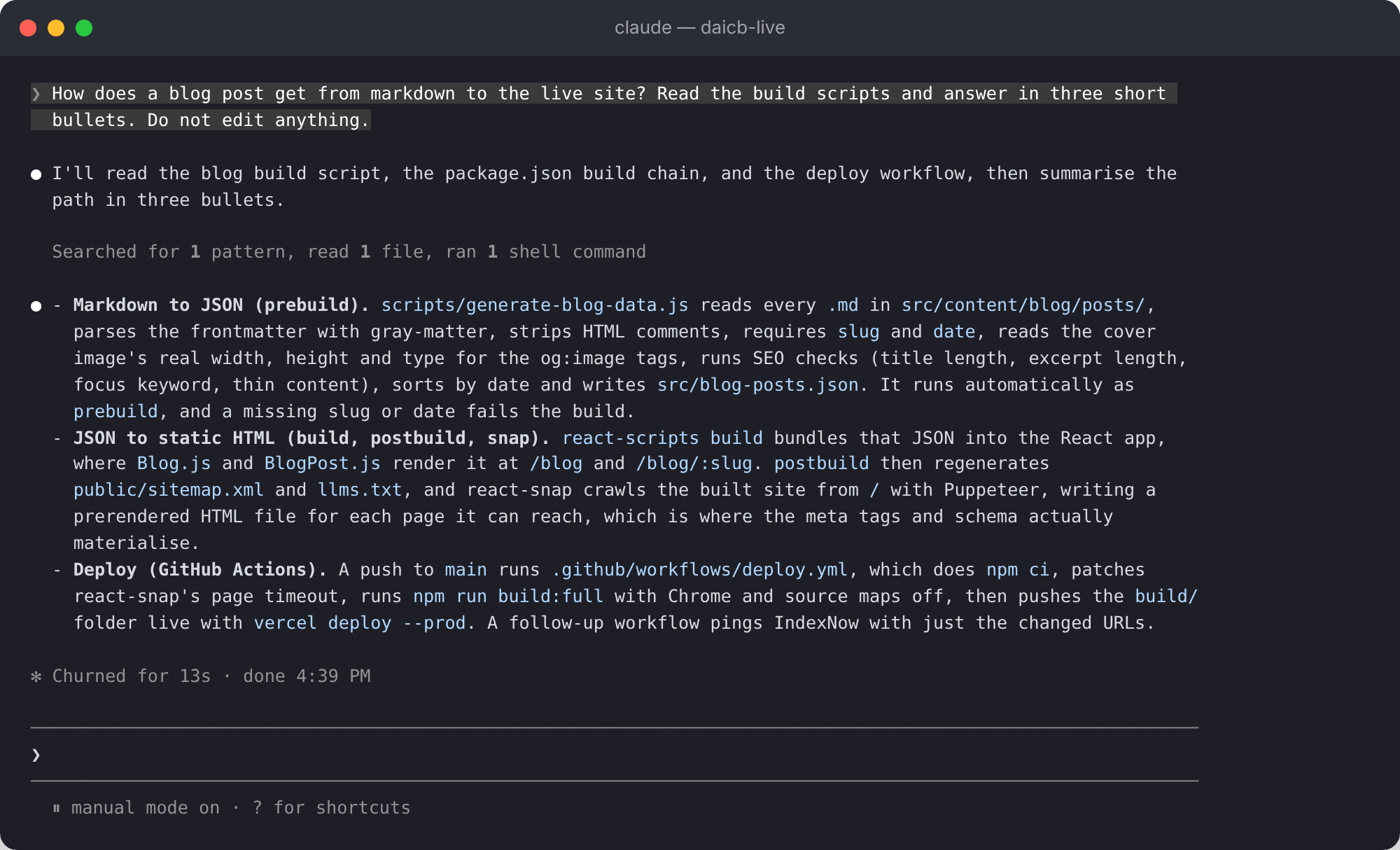
The terminal
The original and still the most complete. Open a terminal in your project, type claude, and describe the job. It reads the codebase, makes a plan, edits across files, runs the tests and commits. If you have never opened a terminal, I will show you in the first five minutes.
VS Code, Cursor and JetBrains
The same engine inside your editor, with inline diffs, @-mentions of files and plan review before anything changes. Most developers I train end up here for day-to-day work and drop back to the terminal for long jobs.
The desktop app
The Claude desktop app has a Code tab. Review diffs visually, run several sessions side by side, schedule recurring tasks, and hand a terminal session over to it when you want to see the changes. No separate install.
The web and your phone
Start a long-running task at claude.ai/code or from the Claude mobile app, let it work in the cloud on a repo you do not even have locally, and pull the result into your terminal when you are back at your desk.
The Six Things That Make It Work
Anthropic's own guidance is that a fresh session with a plain prompt usually does the right thing. Where it goes wrong is when the agent is missing something it cannot see in the code: the deploy process in someone's head, the file that must never be read, the check that has to pass before anything counts as done. These six are how you give it that. We set up each one on your repo.
CLAUDE.md
A markdown file in your project root that Claude Code reads at the start of every session. Your stack, your conventions, how to run the tests, what never to touch. The single biggest difference between a session that works and one that does not. We write yours together.
Skills
Reusable workflows you invoke by name: a release checklist, a review routine, a deploy runbook. Write the procedure once and Claude Code follows it the same way every time, and your team can share them.
Hooks
Shell commands that run automatically at points in the session: format every file after it is edited, run lint before a commit, block a write to a folder it should never touch. The rules that cannot have exceptions live here, not in a prompt.
Subagents
Spin off a separate agent for a side task, a search across the codebase, a review of your own change, so your main conversation stays focused. A lead agent can coordinate several working in parallel.
MCP connectors
The Model Context Protocol lets Claude Code reach outside the repo: read the design doc in Google Drive, update the ticket in Jira or Linear, pull the error from Sentry, post the summary to Slack. We connect the ones you use.
Plan mode, permissions and git
Plan mode makes Claude Code think and show you the approach before it changes a file. Permission modes decide what it can run without asking. Work on a branch, review the diff, let it open the pull request. This is how you keep the brakes.
What You Can Actually Build With It
Ship a Feature in a Codebase You Inherited
Point it at a repo you did not write. Ask it to explain the architecture, find where the change goes, make it across the files involved, write the tests and open the PR. The onboarding that used to take a week takes an afternoon.
Build an Internal Tool End to End
The dashboard, the admin panel, the small app that never made it onto a sprint. Describe it, review the plan, watch it build and run. This website, my internal tools and an iPhone app were all built this way.
Automate the Chores
Tests for untested code, lint errors across a project, dependency updates, release notes, merge conflicts. The jobs every developer puts off. One instruction, and it does the lot and shows you the diff.
Make a Vibe-Coded Prototype Production-Ready
Built something in Lovable, Replit or Cursor that works until it does not? Claude Code reads what is there, adds the tests, fixes the security holes and structures it so it can be maintained. You own it properly.
Put a Reviewer on Every Pull Request
Run Claude Code in GitHub Actions or GitLab CI so every PR gets a review, every issue gets triaged, and the CI failure at 3am gets a diagnosis waiting for you in the morning.
Schedule Work That Repeats
A morning PR review, a weekly dependency audit, docs that sync after every merge. Scheduled tasks run in the cloud even when your laptop is closed, or on your machine with access to your local files.
The Honest Version: Code, Cowork or Codex?
Open the Claude desktop app and there are three modes side by side: Chat, Cowork and Code. Same subscription, same models, three different jobs. Chat talks. Cowork does: it works on the folders you point it at, with no terminal. Code builds: full project access, a terminal and git. Cowork is built on the same agent harness as Claude Code, wrapped for people who write proposals rather than Python.
So when a founder who does not code asks me whether to learn Claude Code, my answer is usually no. Start with Cowork. When a developer asks, the answer is yes, and the second question is whether to run Codex alongside it. I do. Having one agent review the other's work catches more than you would think. I have written the longer comparison up in Claude chat vs Cowork vs Code and the AI harness wars.
What You Walk Away With
- Claude Code installed and configured where you work (terminal, editor or desktop app), with the one thing from your form built in your real codebase, tested, and on a branch.
- The files: your CLAUDE.md, the skills and hooks we wrote, the MCP connections we set up, and post-session notes with references to everything we built.
- A recording and transcript of everything we covered, searchable and bookmarkable.
- An open line. After the session, you can message me anytime with questions.
I was blown away about how advanced agents are, the world of work is clearly going to be unrecognisable soon.
How the Session Works
After you book, a short intake form. Then 90 minutes together, on Google Meet or in person in London, your choice.
First 30 minutes: The foundations
In time, AI will meet you where you are. Right now the edge is five or six things, and we do them live while we get Claude Code installed on the surface you want: terminal, VS Code or the desktop app. How to describe a job so the agent can finish it, with the check it should run to prove it worked. How to manage context: what goes in CLAUDE.md, why long sessions drift, when to clear and start again. Plan mode, so you see the approach before a file changes. Permission modes and what to let it run. Then skills, hooks and MCP, and which of each your repo actually needs.
Next 60 minutes: The art of the possible
Two or three builds planned from your intake form, in your real codebase: the feature that has sat in the backlog, the tests nobody wrote, the prototype that needs hardening. I drive the first one and explain what made it work. Then you take over while I coach. We write your CLAUDE.md as we go and turn the recurring job into a skill. We watch it make a change, run the tests, hit a failure and fix itself. We review the diff and let it open the pull request. We iterate until it is right.
Before we finish: Make it yours
Where the files live. How to run a job again on Monday without me. The hook that enforces the rule you care about most. What to never let it touch. Which plan fits how you will actually use it, and how to read your usage so you do not hit the cap mid-task. You keep the CLAUDE.md, the skills and the hooks, you can edit them, and they get better over time.
Book Your Claude Code Session
Who This Is For
- Developers who have tried Claude Code, got a mediocre result, and suspect they are using a tenth of it
- Tech leads and CTOs adopting agentic coding who want a shared, safe way of working before the team invents five of its own
- Founders and technical operators who build their own internal tools and want to ship faster
- People who vibe-coded a prototype in Lovable, Replit or Cursor and now need to own and maintain it properly
- Teams on Copilot or Cursor who want an honest, hands-on comparison before they switch
Why Not Just Figure It Out Yourself?
You can. Anthropic's documentation is good and Claude Academy has free self-paced courses, including Claude Code 101. If you have the weekends, use them. What the session adds is the compressed version of my trial and error, on your repo rather than a toy one.
- The difference is the CLAUDE.md. Without one, Claude Code is guessing. With a good one, it knows your stack, your conventions and your rules. Writing one that helps rather than clutters takes experience.
- The difference is knowing what to hand off. Most developers massively underestimate what the agent can finish on its own, and over-trust it on the one thing it should not touch.
- The difference is 90 minutes vs. three frustrating weekends. I have done the trial and error building real products with it. You get the compressed version.
90-minute 1-2-1 co-work session · £699
Sessions are 90 minutes, run over Google Meet or in person in London, planned around your intake form.
That includes installation, your CLAUDE.md, the thing from your form built in your real codebase and running, the skills and hooks behind it, and the recording and transcript.
Book and schedule nowAvailable virtually worldwide or in-person in London.
Not sure Claude Code is the right tool for you? Book a free 15-minute call or message me. Tell me what you're trying to do and I'll let you know if a Claude Code session makes sense, or whether a Cowork session, a Codex session, or a broader personal AI training session would be a better fit. Want the software built for you instead? That's custom web apps.
Frequently Asked Questions
Is this a coding course?
No. It assumes you already write code, or you run people who do. If you have never written a line and do not want to, Claude Code is the wrong tool for you, and I will say so: Cowork is Anthropic's version for non-developers and I run a separate session for it. If you code, even a little, or you have a prototype you built with an AI tool and need to own it, you are in the right place.
Do I need to prepare anything?
The intake form, about ten minutes after you book: your role, the tools you have tried, your top three workflow frustrations, and the one thing you would build if you could only build one. For this session, also have a codebase we can work in. A branch or a copy is fine. Claude Code itself gets installed in the session.
How much does it cost?
A 90-minute 1-2-1 co-work session is £699. That includes installation, your CLAUDE.md, the skills and hooks we write, the recording and the transcript. Team sessions for three to five people start from £2,499.
Do I need a paid Claude plan before the session?
No. We use my subscription during the session. Claude Code is included in Claude's paid plans: Pro at $20 a month, with Max at $100 and Ultra at $200 for heavier use, and it can also run on API credits. Usage is metered in rolling five-hour windows plus a weekly cap, and agentic work burns through it faster than chat. Afterwards I will tell you honestly which plan fits how you would actually use it. Do not buy anything until we have talked.
What's a CLAUDE.md file?
A plain markdown file in your project root that Claude Code reads at the start of every session. It holds what the agent cannot work out from the code alone: your conventions, how to run the tests, the deploy process, the folder it must never touch. If your repo already has an AGENTS.md for other coding agents, Claude Code reads that instead. A good one is the difference between a useful colleague and a confident guesser. I write yours with you in the session.
Should I learn Claude Code or Claude Cowork?
Does the task end with software? Then Claude Code. Does it end with a spreadsheet, a document, a tidy folder or a report? Then Cowork. They run on the same models and the same agent harness, but Code has full project access, a terminal and git, while Cowork has no terminal and works on the folders you choose. Most founders never need Code. Most developers never need Cowork. If you are not sure, message me and I will point you to the right one.
How does Claude Code compare to Codex, Cursor or Copilot?
Codex is OpenAI's agent and the closest rival. I use both and the smart move for a serious team is to run both and have one review the other's work. Cursor and Copilot are editors with AI inside; Claude Code is an agent that works across the whole repo and can run on its own in the cloud. The honest reason many of my technical clients pick Claude Code is that Anthropic currently has the stronger models for agentic coding, and when the models are this good the harness shines. If Codex suits you better, I run a Codex session too.
Is it safe to let an agent change my code?
With the right guardrails, yes, and setting them is half the session. Plan mode shows you the approach before a file changes. Permission modes decide what it can run without asking. Hooks block the things that must never happen. You work on a branch and review the diff like any other pull request. Nothing merges that you have not read.
Can my whole team learn Claude Code together?
Yes. For teams of three to five I run a Team Co-work format where we set up the shared CLAUDE.md, skills and hooks for your repo together, live, so everyone works the same way from day one. Details and pricing are on the AI training for teams page.
Can I get help after the session?
Yes. You get my email. If something breaks or you get stuck, send it over and I will take a look. I do not do ongoing mentoring at this price, but a follow-up email or two? Of course.