

Three Things You'll Get from This
- 1. Prompting that actually works inside CopilotMost people type "summarise this" into Copilot, get something bland, and conclude the tool is rubbish. The tool isn't the problem. The prompt is. I'll show you how to tell Copilot who the output is for, what good looks like, and which of your own files and emails to read first. You'll learn the difference between asking about your work data and asking the web, and when to use each. And the hack that changes everything: ask Copilot to write the prompt for you.
- 2. Copilot across the apps you already live inCopilot isn't one chat box. It's in Teams, catching you up on the meeting you missed and pulling out who promised what. It's in Outlook, summarising a 40-message thread and drafting the reply in your tone. It's in Word, Excel and PowerPoint, turning a brief into a first draft, a messy sheet into analysis, a document into a deck. Then there are Work IQ, Notebooks, the Researcher and Analyst agents, and the agents you can build yourself. I'll show you which of these are genuinely useful for your job, which are gimmicks, and where Copilot is weaker than ChatGPT or Claude. Plus the risks: hallucinated action points, oversharing, and trusting a summary you haven't checked.
- 3. A live build of something you actually needBring the thing that eats your week. The Monday status report. The board pack you assemble from six people's emails. The client update you write from meeting notes. We build it together in the session, using Copilot on your laptop, with your data. You leave with a working prompt, a saved agent, or a repeatable process. Not a hypothetical. Yours, done, and ready for next week.
It's quite amazing what is possible today. I don't think I appreciated how far along the technology is already beyond basic ChatGPT.
Four Things I'll Show You Inside Copilot
These are screenshots from my own Microsoft 365 Copilot (Premium) account, not Microsoft's marketing. Each one is something we can set up for you in the session.
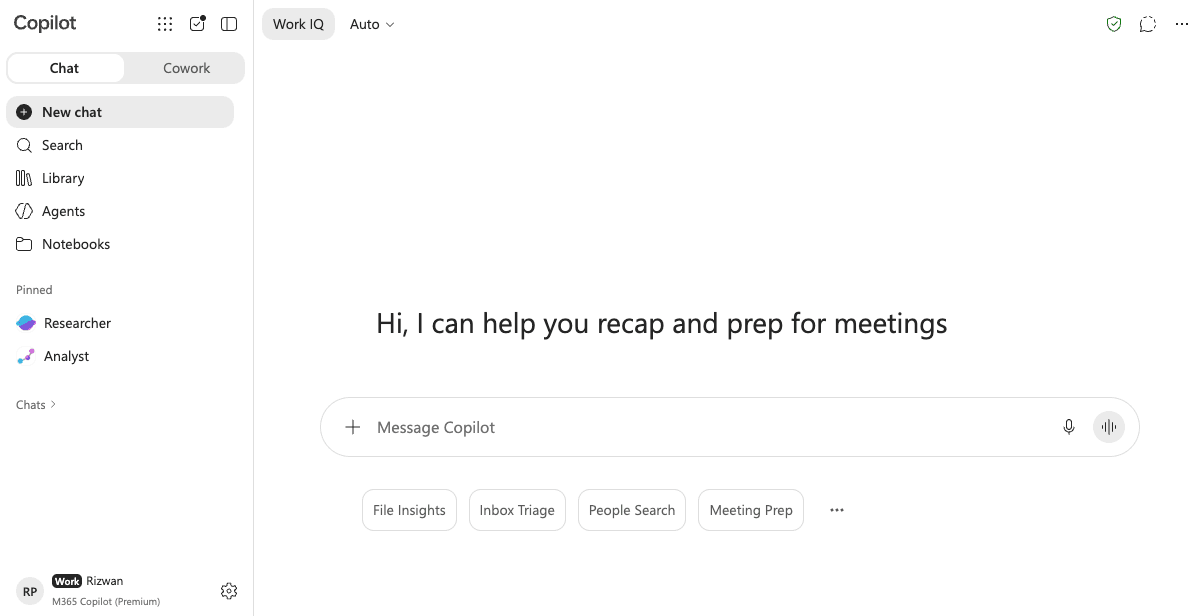
Work IQ, models, and the lay of the land.
The Copilot app has changed a lot and most people are still using it like the 2024 version. I'll explain Work IQ, which is Copilot grounded in your emails, files, meetings and people. How to pick the best model for a task rather than leaving it on Auto. When to hand a question to the thinking agents, Researcher and Analyst, instead of plain chat. What Notebooks are for. How to work between Chat and Cowork if your tenant has Cowork switched on. And the difference between Copilot Premium and the basic Copilot that comes with Microsoft 365, so you know what you're actually paying for.
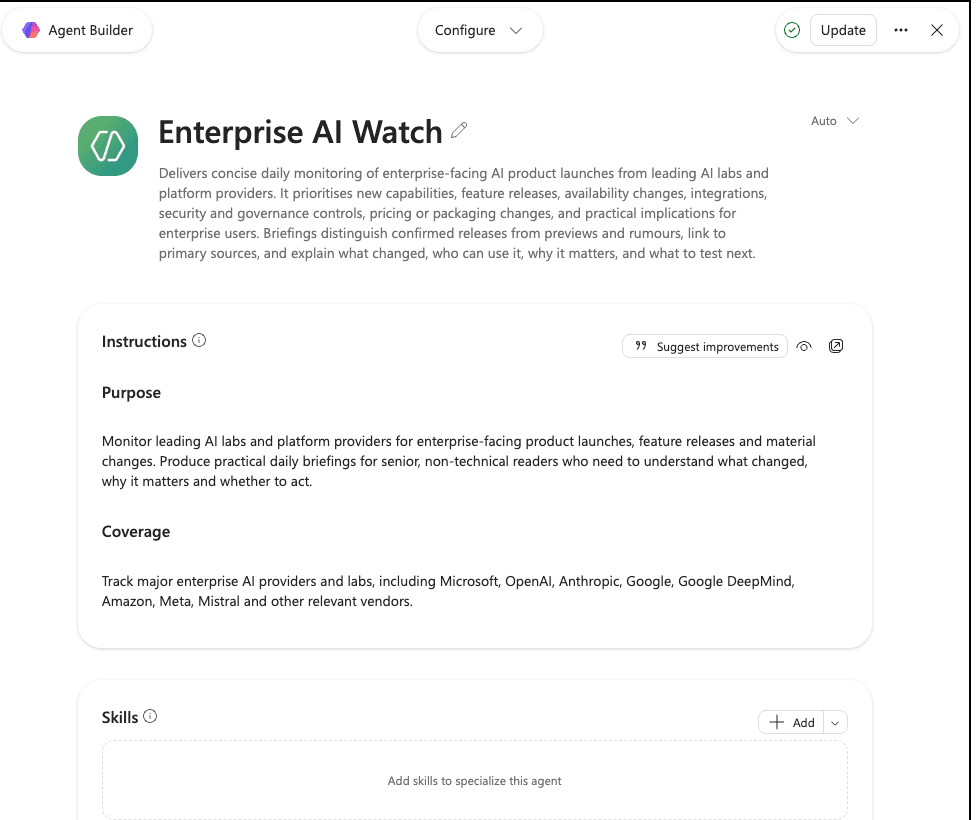
Agents that do work for you.
This is Enterprise AI Watch, an agent I built in Agent Builder. It monitors the major AI labs for enterprise releases and writes me a short daily briefing: what changed, who can use it, why it matters, what to test next. I'll show you how to set up agents that run autonomously, how to write instructions they'll actually follow, and how to schedule recurring prompts so the work is waiting for you every morning instead of you having to ask.
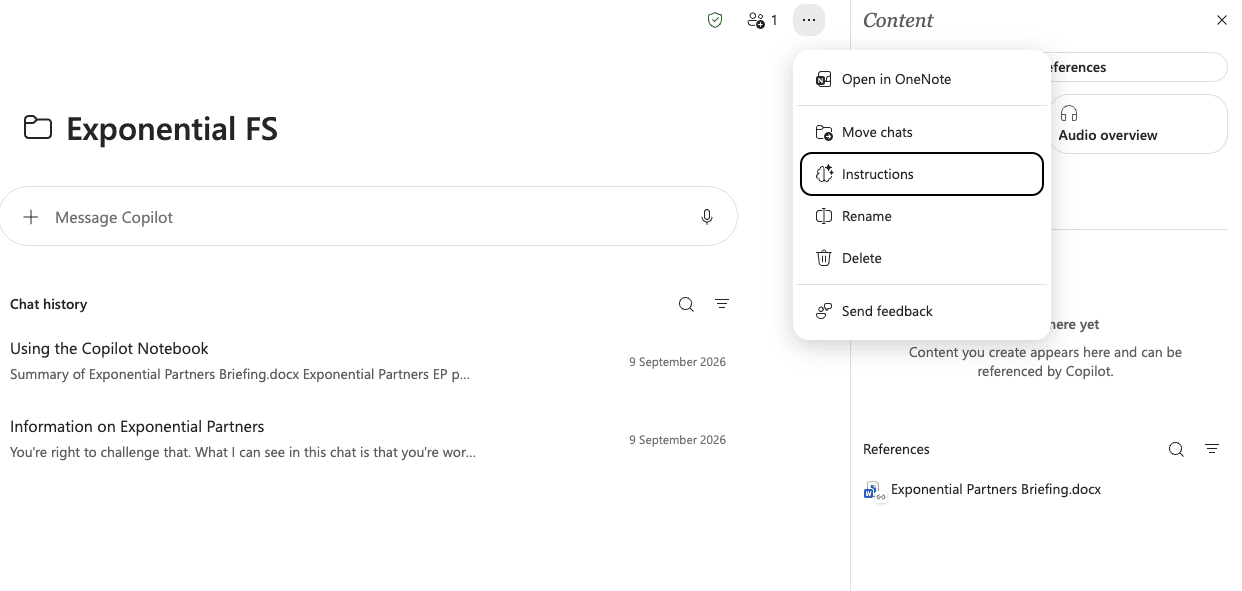
Notebooks that remember who you are.
Every new Copilot chat starts from zero. Notebooks fix that. This one is for Exponential FS, with instructions that tell Copilot who I am and what I do, and a reference document it reads before every answer. Set one up per client, project or team, and Copilot stops asking you to explain the basics in every conversation. We'll build your first one in the session, with your own instructions and your own references.
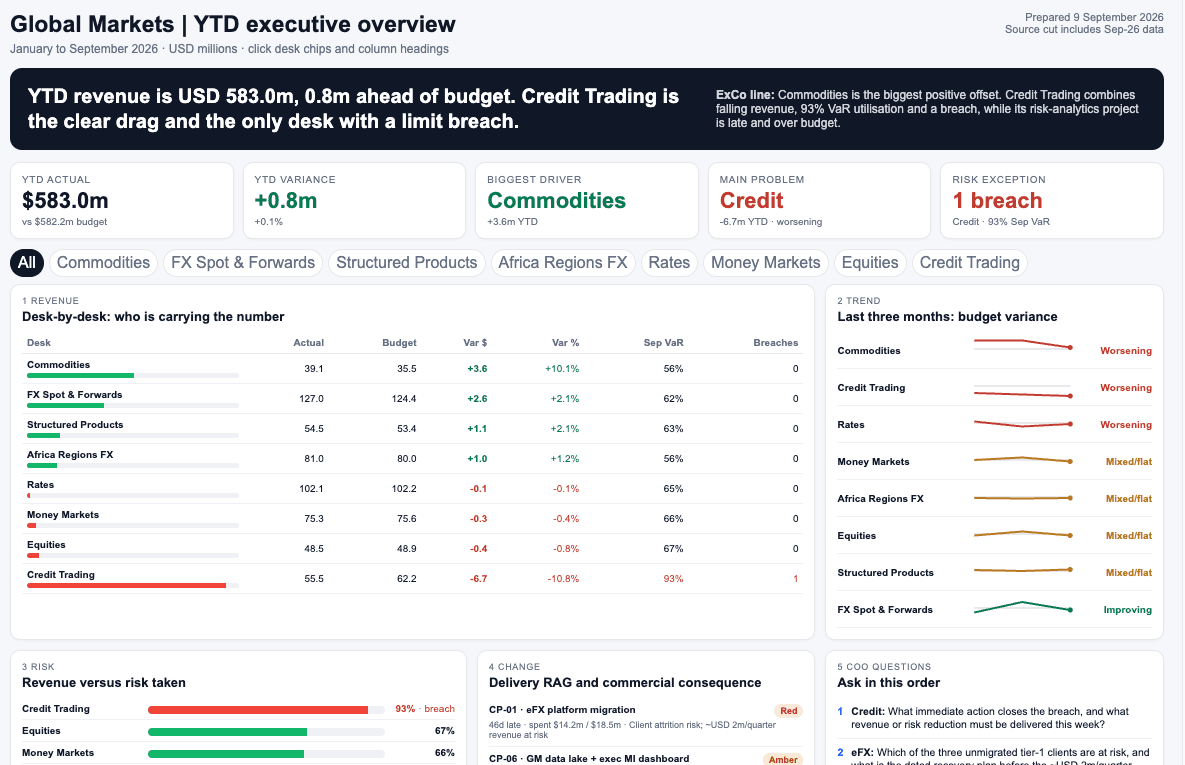
Interactive dashboards from a prompt.
This is a year-to-date executive overview for a Global Markets business, built as a single interactive HTML page. Click a desk and the tables filter. Click a column heading and it sorts. Headline numbers, trend lines, a RAG view and the questions the COO should ask, all on one screen. No BI licence, no developer. I'll show you how to produce dashboards like this for any use case: sales pipeline, project status, team capacity, monthly board pack.
Why Most Copilot Rollouts Go Nowhere
I trained a team at a company that had bought 5,000 Copilot licences. Five thousand. They'd hired a Microsoft-approved vendor to run the rollout. Everyone got a login, a one-hour webinar about the interface, and an email saying "have a go". Six months later most people were using it to tidy up emails, if at all.
That's the pattern I see everywhere. The licence gets bought at the top. The training covers which button is where. Nobody sits with the actual person doing the actual job and asks: what takes you too long, and could Copilot do it? That gap is what this session fills. One person, their real work, 90 minutes. I've written about the wider problem in why plug-and-play AI is a myth and why AI isn't boosting productivity yet.
What We'll Actually Cover
Before the session, I send you a short questionnaire. What you do, which Microsoft 365 apps you spend your day in, what you've already tried in Copilot, and what you'd like off your plate. I read it before we start so we don't waste time on basics you already know.
First 20 minutes: Fundamentals
How these models actually work, at the level that matters for your job rather than the theory. Why Copilot's answers are sometimes brilliant and sometimes useless, and how to tell which you've got. What Copilot can see in your tenant and what it can't. What Work IQ means and when to switch it off. Which model to pick and when Auto is fine. Where it sits against ChatGPT and Claude, honestly. Context that makes the next 50 minutes land.
Next 50 minutes: Live work on your laptop
You bring a real task. We work through it in the apps you use. Teams meeting recaps and the questions worth asking them. Outlook thread summaries and drafts that sound like you. Word drafts built from the documents you point Copilot at. Excel analysis without writing a formula. A PowerPoint first draft from a Word brief. Then we build your thing: a Notebook that knows who you are, an agent that runs on a schedule, an interactive dashboard, or a reusable prompt your team can share. We test it. We fix what's wrong. We make it repeatable.
Last 20 minutes: Your questions
What you're worried about. How to check an answer before you send it. What to do when your IT policy blocks something. How to show your manager the licence is paying for itself. What to try next week.
This is practical. You'll leave with a full recording, a searchable transcript, and post-session notes with links to everything we covered. You'll know what to do on Tuesday. Want the full breakdown? Read what happens in a session.
Who This Is For
- People whose employer rolled out Copilot and left it at that. You've got the licence and a vague sense you should be using it more. You should. Let's find out for what.
- Finance, legal, compliance and ops people in regulated firms where ChatGPT is blocked and Copilot is the only AI you're allowed to touch. That's fine. Used properly it does more than you think, and I'll show you exactly where its limits are.
- Managers asked to "drive adoption" who need to understand the tool before they can get their team to use it. You'll leave able to demonstrate three things that work and explain why they work.
- People who tried Copilot, got a mediocre answer, and wrote AI off. You weren't wrong about the answer. You were wrong about why you got it. An hour and a half fixes that.
- Copilot champions and power users who've done the Microsoft learning paths and want someone who uses ChatGPT, Claude and Copilot daily to show them the patterns that actually hold up at work.
How This Works: 90 Minutes
You book a 90-minute session. We run it online or in person in London, your choice. You bring your work laptop, logged into Copilot. We do the work. That's it.
No packages. No upsell. No "you'll need the premium bundle."
- 90 minutes of my full attention
- A recording and transcript of the whole session
- Post-session notes you can refer back to whenever you need them
Available online worldwide or in person in London.
Or if you want to know what happens in a session before you commit, read the detailed walkthrough at what happens in a session.
Need this for a whole team? See AI training for teams. Questions first? Email me or check out my broader personal AI training page. You can also read about why 1:1 training beats generic AI courses.
Common Questions
Do I need a Microsoft 365 Copilot licence before the session?
Ideally, yes. Work IQ, Notebooks, the Researcher and Analyst agents, and Copilot inside Word, Excel, Outlook and Teams all need the paid Microsoft 365 Copilot (Premium) licence, and that has to come from your employer. If you only have the basic Copilot that ships with Microsoft 365, the session still works. We focus there, and I show you exactly what Premium would add so you can make the case for it, or decide you don't need it. Either way, bring your own work laptop, logged in. I can't log into your company's tenant, and Copilot's whole value is being inside your data.
Is Copilot as good as ChatGPT or Claude?
Honestly? Not as a raw chat experience. Copilot now lets you choose the model, or leave it on Auto, but it wraps every model in extra guardrails and the app tends to lag the frontier ones. Where it wins is access. It can read your emails, your meetings, your files and your calendar, with your company's permissions and data protection already applied. If your company blocks everything else, Copilot used well beats ChatGPT you're not allowed to use. I use ChatGPT, Claude and Copilot every week, and I'll tell you plainly where Copilot falls short rather than pretend it doesn't.
Will my IT department mind?
You're using the tool they bought, on your laptop, with your own account. Nothing leaves your tenant. If you want, invite your IT contact or your Copilot champion to sit in. I've trained teams at companies that had bought thousands of Copilot licences and the IT team was usually relieved somebody was finally showing people what to do with them.
Is Copilot safe with confidential company data?
Microsoft 365 Copilot comes with enterprise data protection. Your prompts and its answers stay in your tenant and aren't used to train the models. Copilot can only see what you can already see. The real risk is oversharing: files that were shared too widely years ago and that Copilot will now happily surface. We'll cover how to spot that, what not to paste in, and how to check an answer before you forward it to your boss.
Can you train my whole team on Copilot?
Yes. For teams of 3 to 15 I run a separate team format, in person across the UK and Europe or online. Have a look at the AI Training for Teams page, or email me and tell me what the team does.
Will we cover Copilot agents and Copilot Studio?
We'll look at the agents you can build yourself inside Copilot Chat, because that's where most people get the quickest win: an agent that knows one SharePoint folder and answers questions from it. Copilot Studio is an IT-level tool. I can show you what's possible with it, but a 90-minute session isn't the place to build a full Studio agent.
Do I need to be in London to do this?
No. We can run it online. I'm based in London and happy to do it in person, but the session works just as well remotely. We can even run it on Teams, so Copilot recaps it for you afterwards.