What a context window is, and why ChatGPT forgets
By Riz Pabani on 12-Oct-2026
Most people who use ChatGPT for anything long have had the same experience. The first hour is great. Then the answers get vaguer, it forgets something you told it at the start, and eventually it contradicts itself with total confidence.
The usual conclusion is that the tool is flaky. What's actually happening has a name: the context window. If you use AI for real work, it's the most useful thing you can understand about it, and almost nobody explains it.
So I built a lesson on it in Autocomplete, the free course on how AI actually works that I made with Nadia Somani. This post walks through what happens in that lesson, what a context window is, and the habits that stop it catching you out.
The model has a desk, not a library
That's the headline of the lesson, and it's the best way I've found to explain it.
Everything the model can see at once sits on one desk. Your instructions. Every document you've attached. The whole conversation so far, including its own replies. That desk is the context window.
It's measured in tokens. A token is a chunk of text, roughly three quarters of a word. A 128,000-token window holds something like 96,000 words, which is about one long novel.
When the desk is full and you put something else on it, something falls off. Nothing tells you.
This matters because of what these tools are underneath. I call them Autocomplete Machines. They predict the next word based on what's in front of them. If a document has fallen off the desk, it can't shape the answer, however important it was.
What happens in the lesson
You don't read about this in Autocomplete. You do it.
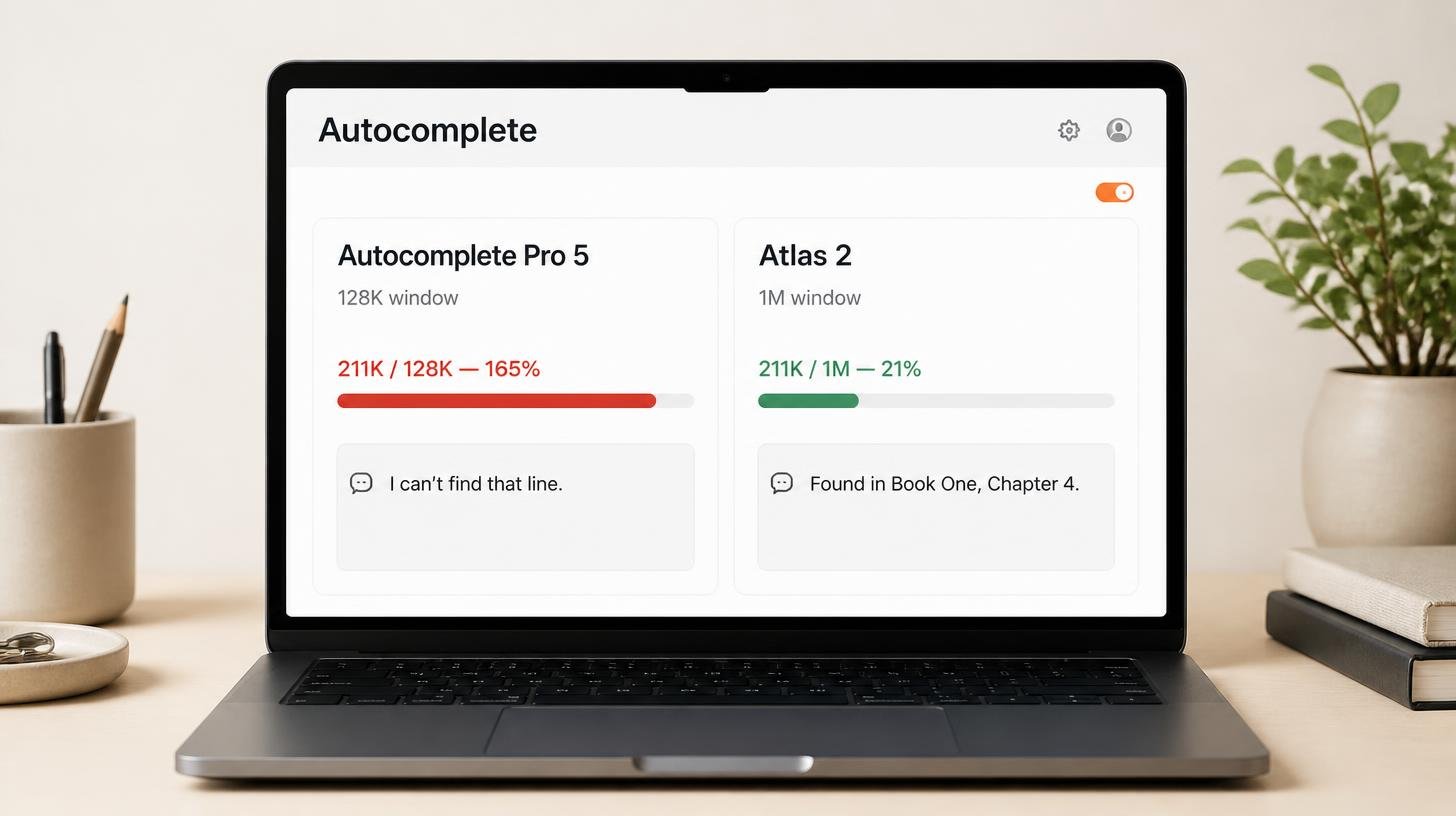
The lesson starts you on a pretend model called Autocomplete Pro 5, with a 128,000-token window. A meter along the bottom shows how full the desk is.
First, you attach Philosopher's Stone. That's about 99,000 tokens. The meter jumps to 77% and a green tick says everything attached is visible to the model.
Then you ask where Hagrid first says "You're a wizard, Harry". It finds it straight away: Chapter 4, "The Keeper of the Keys", the hut on the rock. It even corrects you. In the book Hagrid's line is "yer a wizard", and the tidy version is the film's.
Next, you attach Chamber of Secrets. Another 112,000 tokens. The meter turns red. That's 211,000 tokens on a 128,000-token desk, 165% full, over capacity by 83,000 tokens.
Then you ask exactly the same question.
This time the model says it has searched the text it can see and the line doesn't appear anywhere. Chamber of Secrets is there in full, it says, and Hagrid never says it. Then it asks whether you're sure the line is in these books at all.
This is the part where people go quiet. A minute ago it found the answer. Now it's politely suggesting you've made it up.
Why it got it wrong with total confidence
Book one fell off the desk. To make room for Chamber of Secrets, the earliest material was silently truncated. The model searched everything still in front of it, and the line wasn't there.
So it's being accurate about what it can see. It has no way of knowing what it can no longer see, and neither do you. The lesson sums it up in four words: overflow doesn't announce itself.
That's what makes this risky at work. Picture pasting a 90-page credit agreement into a chat, then a second one, then asking which facility has the tighter covenant. If the first agreement has quietly dropped out of view, you get a clean, well-formatted answer based on half the evidence. It won't look broken. You'd have no reason to check.
I see the everyday version of this in sessions all the time. A client I worked with recently asked me, "why is it getting worse the more we get into this?" She'd been running one long thread for months, pasting documents in as she went. Her desk was buried.
One honest caveat. Real apps handle a full window in different ways. Some drop the oldest messages. Some summarise earlier parts of the chat to save room. Some only pull in the parts of a big file they think are relevant. The mechanics vary, but the effect on you is the same: something you gave it earlier may no longer be informing the answer, and you won't get a warning.
Same books, bigger desk
The last step of the lesson is the fix. You switch the model to Atlas 2, which has a 1,000,000-token window.
Same two books. Same 211,000 tokens. Same question. The meter drops to 21% and goes back to green.
This time it finds the line in Philosopher's Stone and says it can see both books in full. The only thing that changed was the size of the window.
Real models vary a lot here. Some offer a million tokens or more, others far less. The chat app you use doesn't always give you everything the underlying model supports, either. If you're about to load a stack of long documents, check the window size of the model you're using first.
Why a bigger window only solves part of it
A bigger desk helps when you really do need to load a lot at once. Most of the time, though, you aren't loading a shelf of novels. You're three hours into one chat that wandered from a tax question to holiday plans to a contract review.
Every message you've sent in that conversation is still on the desk. The longer it runs, the less room there is for the thing you care about now. Quality also tends to drop as the window fills up. A model working from a clean desk does better work.
One programme director I trained found the tools frustrating. The output got worse the more he used them. Once I showed him how to manage the length of his chats and start fresh ones, he called it magical. Same tool, same person.
Four habits that stop this catching you out
None of these need any technical knowledge.
- New task, new chat. When you move from one piece of work to another, open a fresh conversation. It's faster and the answers are sharper.
- Reset a chat that's going sideways. Ask it to summarise what you've agreed so far in a few lines. Open a new chat, paste the summary in, and carry on. It's the quickest fix I know for a conversation that has lost the plot.
- Only load what the question needs. If you want one clause from a contract, paste the clause rather than the whole bundle.
- Set your context once, in a project. ChatGPT and Claude both let you create projects, so every new chat starts with the right background and nothing else.
That last habit closes the loop. A bigger window helps when you need to load a lot at once. A project is what makes starting fresh painless, because you stop re-explaining who you are and pasting the same documents into every chat. It's the next lesson in Autocomplete, lesson 5 on projects.
Try lessons 4 and 5, then try it on your own work
Do lesson 4 and lesson 5 together. Each takes a few minutes, they're free, and there's no sign-up. Start with lesson 4 on the context window to see the problem, then lesson 5 on projects for the fix you'll use every day. If you'd rather start from the beginning, the full Autocomplete course has eight short modules.
If you want to set this up on your actual work, that's what a 1-2-1 co-work session is for. We take a real task from your week, set up projects so the model starts with the right context every time, and build the habits in live. Read what actually happens in a session, or book a session.
Not sure whether it's right for you? Message me. I'll tell you honestly.
Related Articles

AI cited my site 18,400 times and I had no idea
Google Search Console has a hidden report on how often AI Overviews and AI Mode show your site. Mine...
How my Grok Bot chief of staff grew into eight bots
Six weeks on, my Grok Bot chief of staff runs seven specialist bots. What they do each week, what br...
Claude skills for finance, and how to build your own
Claude skills for finance: the eight in Anthropic's Finance plugin, what they did on real data, and ...
How to create Claude Cowork skills by doing the work first
Build Claude Cowork skills that work first time. Do the task once, correct it, then have Claude pack...