Hermes Agent Bot Mode: how I run a fleet of AI bots
By Riz Pabani on 08-Sept-2026
Last week I wrote about setting up Grok Bot. That's the accessible version, the one you can stand up in an afternoon. This is what runs underneath my actual operation.
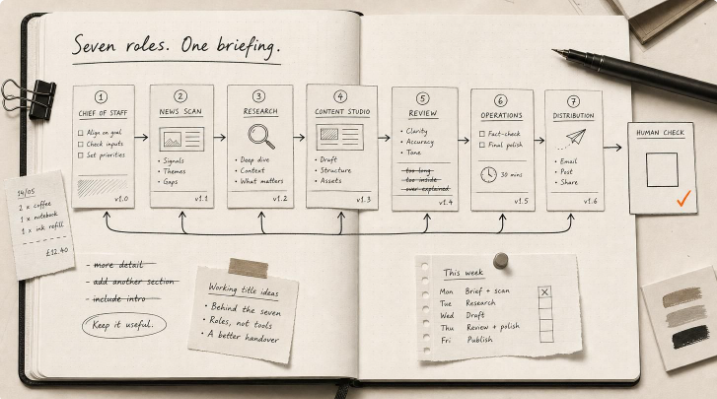
For the past week I've been running seven AI bots on Hermes Agent. They research, draft, review each other's work, and file things while I'm asleep. None of them can publish anything to the outside world without me pressing the button.
That last part is the whole design, so I'll say it plainly up front. No single bot is allowed to both create something and ship it. Everything below is built around that one rule.
What Hermes Agent bot mode actually is
Hermes Agent is a tool from Nous Research, and it has a Bot Mode. The idea is simple. Each bot is a fully separate profile, with its own persona, its own skills, its own memory, its own workspace, and its own scheduled jobs. You talk to a bot by name, like @chief-of-staff. Bots can message each other. And they can run on their own, on a timer, with nobody watching.
If you've only ever run one Hermes profile, this is the step up from running multiple Hermes agents on one server. Same isolation, but now the bots hand work to each other.
I run seven of them. One is a Chief of Staff that I talk to and that delegates to the rest. One handles business operations and the daily AI-news scan, and I call it Neo. One is a content studio that researches and drafts. One is a distribution bot whose only job is to review finished content and gate what goes out. The last two run content for my coaching service and for a consumer app I look after.
The important part is how the jobs are split. The content studio can draft, but it can't approve or publish. The distribution bot can review and it can post, but only content I've personally approved, and only the exact version I approved. I hold the approval. So creation, review and sign-off sit in three different places, and none of them collapses into one bot that could go rogue and post on its own.
I asked one bot to build the others
Here's the part that still feels strange to say. I didn't build most of these bots myself. I asked my Chief of Staff bot to build them.
I gave it a plain-English brief: create a coaching-service bot, a social-media bot that drafts, and a distribution bot that does a final review, checks the content, requests my approval, and then posts through Buffer. It went and made them.
The mechanics are worth copying if you try this. Each new bot was cloned from one I already had working, so it inherited a known-good setup rather than starting from a blank slate, but without dragging along the old bot's memories or conversations. Each got a tight description, its own working directory, and one custom skill for its core job. Nothing more. A bot with one clear job and one skill behaves far better than a clever generalist you keep re-explaining things to.
I also had it design the safeguards in from the start rather than bolt them on later. The coaching bot is forbidden from inventing offers, prices, testimonials or outcomes. The distribution bot has to have the exact version approved, and has to ask again if a single word changes. Anything going to Buffer gets a duplicate check and a read-back. None of this was added after something went wrong. It was the starting condition.
One pitfall cost me time, so I'll pass it on. A bot created from the command line can show up in the desktop app as a row you can't actually open. A visible row is not proof of a working bot. It needs a properly seeded chat behind it, which the desktop "new agent" flow builds for you but the command line doesn't.
Robot staff that clock in on a schedule
The bots I get the most out of are the ones on a timer. I think of them as staff who clock in.
The pattern I'd steal first is what I call generate-then-send. The thinking and the sending are two separate jobs. One bot does the hard part on a schedule: research, draft, check. It writes the finished result to a file. Then a second, much dumber job, a plain script with no AI in it at all, is what actually sends the thing. The clever, unpredictable part never has its hand on the send button. That split has saved me more than once.
My business-ops bot runs a small team of these. A morning AI-news briefing. A separate market-intelligence brief that asks "what should I decide today" rather than "what happened." A daily tracker for a client implementation. A reply-processor that checks its inbox six times a day, updates my pipeline files, and drafts responses for me to review. Then weekly jobs for pipeline status, a strategy memo, and metrics. A front desk, an analyst and a reporter, all on timers.
Two operational lessons I learned the hard way. First, I changed the underlying AI model three times in one week, chasing cost and quality, and a global setting doesn't do what you'd expect. Each bot carries its own model choice that overrides the global one, so you change it bot by bot. When I moved most of the fleet to DeepSeek V4 Flash to save money, I deliberately kept GPT-5.6 Luna Pro, the expensive and more careful one, on a single bot: the distribution bot that guards what gets published. That's the one place I won't save a few pence. Each bot also has a fallback, so when one provider hit a rate limit mid-week, the bots switched to another and kept working.
Second, the scheduled jobs fail safe. A couple of mine started refusing to run after I changed the default model. That turned out to be deliberate. If a scheduled job isn't pinned to a specific model and the default underneath it changes, Hermes refuses to run it rather than quietly running your automation on a different brain than the one you tested. The fix is to pin each job to a model. Annoying for an afternoon, exactly what you want for anything that spends money or posts in public.
One idea, four bots, one human
The clearest example of the whole thing working was a weekly "This Week in AI" editorial I wanted to run: one longer article I publish by hand, and a short company post that goes out on LinkedIn through Buffer. I could have written it myself in an hour. I had the fleet do it instead, to see whether the handoffs held. Here is how one idea moved through four bots.
My news bot built a source brief from the week's daily briefings: the raw material, with everything traced back to where it came from. It handed that to the content studio.
The content studio wrote the editorial, then rewrote it. Six versions, each one a separate file, each marked as superseding the last rather than overwriting it. So there was a full paper trail, not a single file quietly changing under me.
Every version went to the distribution bot for an independent review, and this is the part I'm proudest of. It sent drafts back marked "revision required" with specific reasons: a company's wording had been misquoted, a claim wasn't attributed, an interpretation was being presented as fact, an opener read too much like a slogan. It rejected several drafts. And it never once approved its own review. Even a clean editorial pass came back stamped as a content check, explicitly not permission to publish.
Only then did it reach me. I approved one exact version. That version was locked with a hash, the outgoing post was checked against it character by character, it was published once with no retries, and then the bot read the live post back to confirm it matched. One idea, four bots, and a human holding the only key to the outside door.
The bots pass work to each other by posting into each other's chats and replying with a short receipt: what they accepted, what's missing, what they'll deliver next. The content itself moves as files in shared folders. It's unglamorous, and that's exactly why it works. You can go back and read precisely what happened.
Why none of them can publish on their own
The human approval step sounds like it would be a rubber stamp. This week it kept earning its place.
The distribution bot works to a rule I gave it: never treat silence, a thumbs-up reaction, an old approval, or approval of something similar as permission. Approval means I approved this exact thing, now.
That rule kept catching things. When a posting slot had already passed by the time the instructions reached it, the bot refused to just pick a new time and post. It stopped and asked. When Buffer had no saved credentials, it refused to guess its way around the problem or find another route. It told me the single safest next step and waited until I'd added the access securely. Nothing went out until I did.
The best example came from the consumer-app content. That bot produces posts into a holding area and shows me each one, with the finished video, the caption, everything, then waits for me to reply approve or revise. One week it presented a poster image for approval, then caught on a closer look that the merged figures in it read as recognisable real people, which its own rules forbid. It pulled its own submission before I had even ruled on it.
And the gate caught a failure I would have missed entirely. I asked why I was only approving one post that week when we were meant to be doing two. That question exposed that the job producing them had quietly died halfway through, hit a credit limit, while the scheduler still cheerfully reported it as "launched." Without something forcing the finished work in front of me for approval, I would never have noticed the silence.
That is the case for building it this way. The gate exists for exactly these moments: the quiet failures you only catch when something makes you look before anything ships.
Steal this if you're building your own
If you're going to run more than one or two bots, a few things are worth taking from all this.
- Split creation, review and approval across different bots. Never let one bot both make something and publish it.
- Use the generate-then-send pattern for anything that goes out. Let the AI draft to a file, and let a dumb script do the actual sending.
- Keep your most careful, most expensive model on the bot that guards publishing, even if you cut costs everywhere else.
- Make your bots read back what they did from the outside, instead of trusting their own report that it worked.
- Pin your scheduled jobs to a specific model so they fail safe when you change things.
None of this needs Hermes specifically. The Grok Bot setup I wrote about last week follows the same shape with far less plumbing. Hermes Agent bot mode is where I go when I want full control over each bot's model, memory and schedule, and I'm willing to run the machine myself.
This is the kind of setup I build with people in my Dreams AI 1:1 sessions: 90 minutes, using your actual tools and your actual workflow. Here's what happens in a session if you want to see the shape of it first.
Not sure where to start? Message me — I'll tell you honestly whether this is something you need help with or can handle yourself.
Related Articles

How I run two businesses from one Claude Cowork workspace
I run two businesses from one Claude Cowork workspace. The setup file by file, from a real client se...
Sovereign AI explained with Cohere, Claude and Mistral
What sovereign AI actually means, the four ways to run a model, and five questions to ask vendors be...

Claude and ChatGPT Projects vs a folder on your laptop
Claude and ChatGPT Projects are for the team. A folder is for your own work. How to choose, set each...
AI cited my site 18,400 times and I had no idea
Google Search Console has a hidden report on how often AI Overviews and AI Mode show your site. Mine...