How to run multiple Hermes agents from one server
By Riz Pabani on 06-Jun-2026
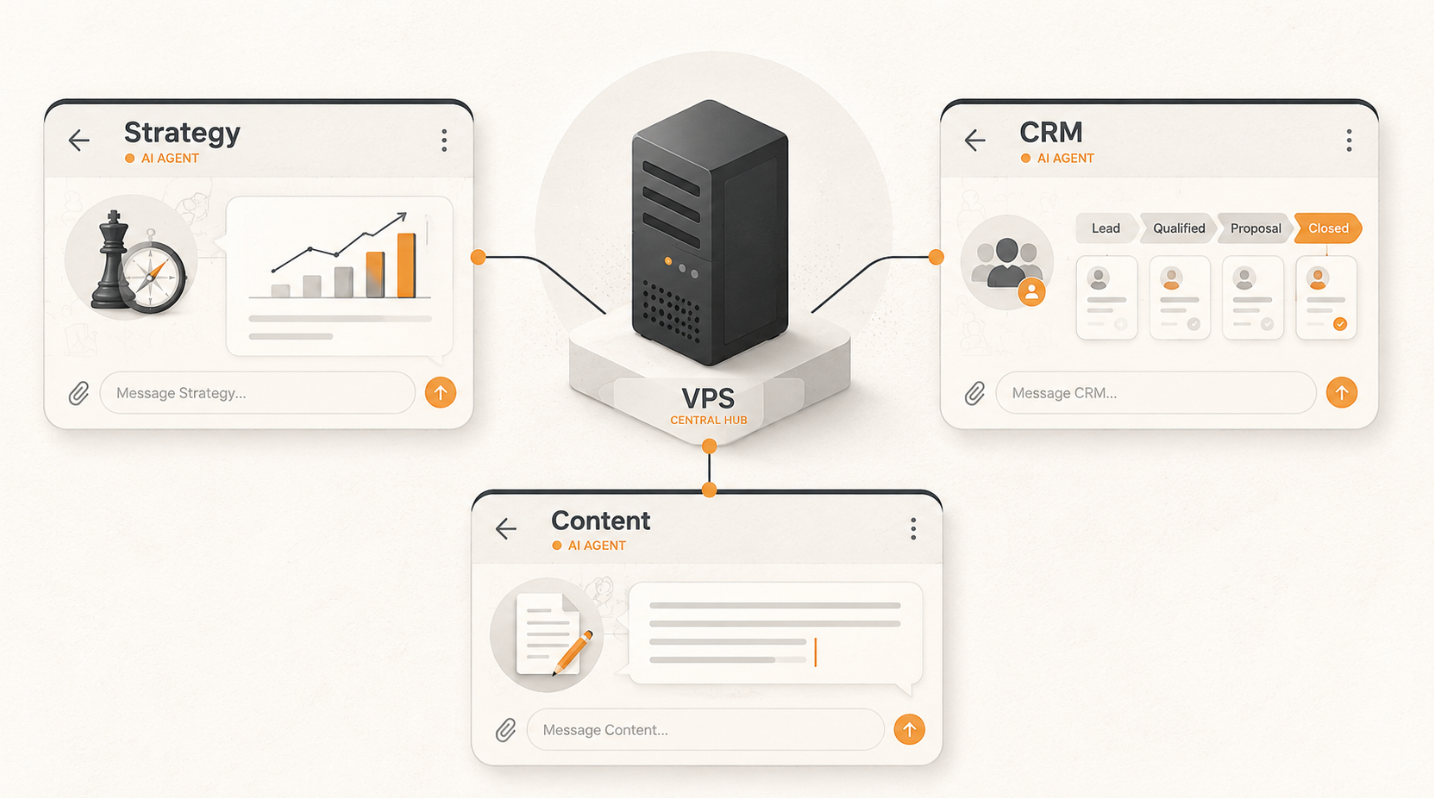
Most people who set up a self-hosted AI agent end up in the same place. You get Hermes running, you point it at Telegram, and for a few weeks it feels like a superpower. It remembers your context. It gets a little better every week. You ask it everything.
Then you start piling things on. Business strategy in the morning. CRM admin after lunch. A blog post in the evening. The agent handles all of it, but the answers start feeling averaged out. The strategy advice gets a bit too chatty. The writing comes back a bit too corporate. One agent that knows a little about everything ends up sharp at nothing.
That's the point I hit. The fix wasn't a better agent. It was more of them. Hermes has a built-in system for running multiple Hermes agents from one install, and I now have three: one for business strategy, one for CRM, one for content. Each with its own memory, its own skills, and its own Telegram bot. This is how I set it up, with the commands you can copy.
I'm assuming you already have one Hermes agent running. If you don't, set that up first and come back. This is the next step, not the first one.
Why one agent starts to creak
This is the generalist problem, and it's the same reason you don't hire one person to do sales, engineering and copywriting at once. It works at small scale. Then it doesn't.
An agent doing everything has a context problem. It's holding your strategy notes, your customer list and your brand voice all in the same head. Ask it to write a LinkedIn post and it reaches for the analytical tone it built up helping you with strategy. Ask it a pricing question and it answers like a copywriter. None of it is wrong. It's just blunt.
The other problem is bleed. I don't want my content agent rummaging through customer records to write a post. I don't want my CRM agent freelancing opinions on business direction. Keeping them separate isn't only about quality. It's about each agent having a clean, narrow job and the right tools for it.
Hermes solves this with profiles. One install, many agents, no shared context unless you deliberately wire it up.
What Hermes profiles actually are
A profile is a completely separate agent living inside the same Hermes installation. Each one gets its own configuration, its own memory files, its own skills folder, and its own Telegram bot if you want one.
You install Hermes once. Then you create as many profiles as you need. They sit on the same machine and cost you nothing extra to run, but they don't share what they know. What the CRM agent learns stays with the CRM agent.
The whole thing runs on one VPS. A cheap one is fine, because Hermes itself is light. The cost is in the model calls, and those happen remotely. More on that near the end, because running three agents instead of one does change the maths.
My three agents
Here's the team I landed on. Yours will be different, but the shape is worth stealing.
Strategy is the main one. It holds the big picture: where the business is going, what I'm testing, what's working. I talk to it about positioning, pricing and what to do next. It doesn't touch customer data or write marketing copy. It thinks. A real example from last week: "Based on the AI news from the last seven days and how the site's SEO is performing, do we need to review the keywords we're targeting and go after different ones?" It pulls in what's changed in the market and weighs it against how we're actually doing.
It also does my research. Every morning at 7am it sends me a briefing on everything that's happened in AI in the last 24 hours, and at the bottom it suggests posts I could write off the back of it. I skim it over coffee, pick one, and hand it to the content agent.
CRM handles the customer side. It knows my pipeline, who I've spoken to, who's gone quiet, what each lead is worth. Every two to three days it emails my co-founder and me with the current state of the pipeline and asks us specific questions, and we reply on email. It updates the CRM from those replies. The part I didn't expect to rely on so much is that it asks clarifying questions before it changes anything: "Did you mean to move Client A to lost, or was that just a comment?" We programmed that in deliberately, so it never silently guesses at a customer record.
Content writes. It knows my voice rules, my banned-words list, the formats that actually work. It has no idea what's in my CRM and no opinion on strategy. It has one job and the skills to do it well. When the strategy agent's morning briefing surfaces something worth posting, I tell content "draft a LinkedIn post from this" and it turns the one-line brief into something in my voice.
Three agents, three Telegram bots in my pocket. I message the right one for the job and get an answer from something that only thinks about that job.
You can go further. Some people run a "commander" agent on top that routes requests to the right specialist and reviews the output before it comes back. I haven't needed that yet with three. If you end up at five or six, it starts to earn its place.
Creating a new profile
This is the easy part. One command per agent.
hermes profile create strategy
hermes profile create crm
hermes profile create content
Each command creates a new isolated directory under your Hermes install, at ~/.hermes/profiles/<name>/, with its own config, memory and skills folder. Check they're all there:
hermes profile list
Here's the part that surprised me. Once you create a profile, its name becomes a command. So a profile called content gives you a content command that does everything hermes does, but scoped to that agent. You run setup on it like this:
content setup
That walks you through picking the model and pasting the API key for that specific agent. Do it for each one:
strategy setup
crm setup
content setup
You can give each agent a different model here, which matters for cost. I'll come back to that.
Giving each agent its own Telegram bot
This is what makes it feel like three separate assistants instead of one with three hats. Each profile gets its own bot, so each one is a separate chat in Telegram.
You create a bot through @BotFather, Telegram's official bot for making bots. You do this once per agent.
- Open Telegram and message @BotFather.
- Send
/newbot. - Give it a display name (e.g.
Strategy) and a username ending inbot(e.g.riz_strategy_bot). - BotFather hands you a token that looks like
7123456789:AAH1bG.... Copy it.
Repeat for all three bots. You'll have three tokens. Keep them secret. Anyone with a token can control that bot, and if one leaks you can kill it with /revoke in BotFather.
Now drop each token into its profile's .env file. For the content agent:
nano ~/.hermes/profiles/content/.env
Add the line:
TELEGRAM_TOKEN=7123456789:AAH1bG...your_token_here
Save and close. Do the same for strategy and crm with their own tokens.
You'll also want to lock each bot to your own Telegram user ID so nobody else can talk to it. Message @userinfobot to get your numeric ID (it's a number like 123456789, not your @username), then add it:
TELEGRAM_ALLOWED_USERS=123456789
Then install and start the gateway for each agent. The gateway is the bit that keeps the bot listening:
content gateway install
content gateway start
Check it's alive:
content gateway status
Repeat for the other two:
strategy gateway install && strategy gateway start
crm gateway install && crm gateway start
Now message each bot in Telegram. If it replies, you're done. Three bots, three specialists, one server.
One housekeeping note for a VPS: if you want the gateways to survive you logging out of SSH, enable lingering so the services keep running:
sudo loginctl enable-linger $USER
Curating skills per agent
The profiles are separate, but the real difference comes from what each agent can actually do. That's skills.
Hermes ships with a big library of built-in skills out of the box: browser automation, image generation, terminal access, web search and more. Every agent can see those. The point of separate agents isn't to hide the basics. It's to add specialist skills to the agent that needs them and not to the ones that don't.
Each profile has its own skills folder at ~/.hermes/profiles/<name>/skills/. Anything you add there belongs to that agent alone.
My CRM agent is the clearest example. I've given it skills to manage my CRM directly: read records, add new customers, update where someone's at in the pipeline, flag who's gone quiet. So when I message it, it's not just talking about my customer data, it can act on it. My content agent has skills for my writing formats and nothing that touches the CRM. My strategy agent is lean on tools and heavy on context, because its job is thinking, not doing.
The discipline here is restraint. Don't give every agent every skill. A focused agent with five relevant skills beats a bloated one with fifty. If the content agent can't reach your CRM data, it can't accidentally leak it into a post.
How the agents talk to each other
The question I had going in was whether I'd become the messenger. If the strategy agent needs the CRM agent's data, do I have to copy and paste between two Telegram chats like a human relay?
No. Hermes has two ways for agents to talk to each other.
The first is delegate_task. Any agent can spin up a temporary subagent to do one specific job and hand the result back into the conversation. It's fast and needs no setup. Good for a quick task where the answer needs to come straight back.
The second is the Kanban board, and it's the one worth understanding properly. It's a shared task queue, stored as a small database on the same machine, that every agent can read and write. One agent creates a task, assigns it to another, and Hermes spawns that second agent in the background to do the work. It finishes, marks it done, and the result comes back. No copy-paste, no you in the middle.
Use delegate_task for quick in-session handoffs where the answer needs to come straight back. Use the Kanban board when work crosses between agents, needs to survive a restart, or you want to step in partway through. The next section is the Kanban one in full, because it's the part that turns three separate bots into something that actually works as a team.
The Kanban board: a shared to-do list your agents run themselves
Think of the Kanban board as a to-do list that your agents read and write to on their own. You drop a task on it, say who it's for, and the right agent picks it up and does it without you carrying the work across.
What follows is the practical walkthrough. For the reference version — every hermes kanban verb, the dispatcher, the reliability layer, and how the board differs from goals and background tasks — see the Hermes Agent Kanban guide.
Turn it on once:
hermes kanban init
Then open the dashboard, which is the comfortable place for you to watch the whole thing happen:
hermes dashboard
That opens http://127.0.0.1:9119 in your browser. Click Kanban in the left nav and you get the board.
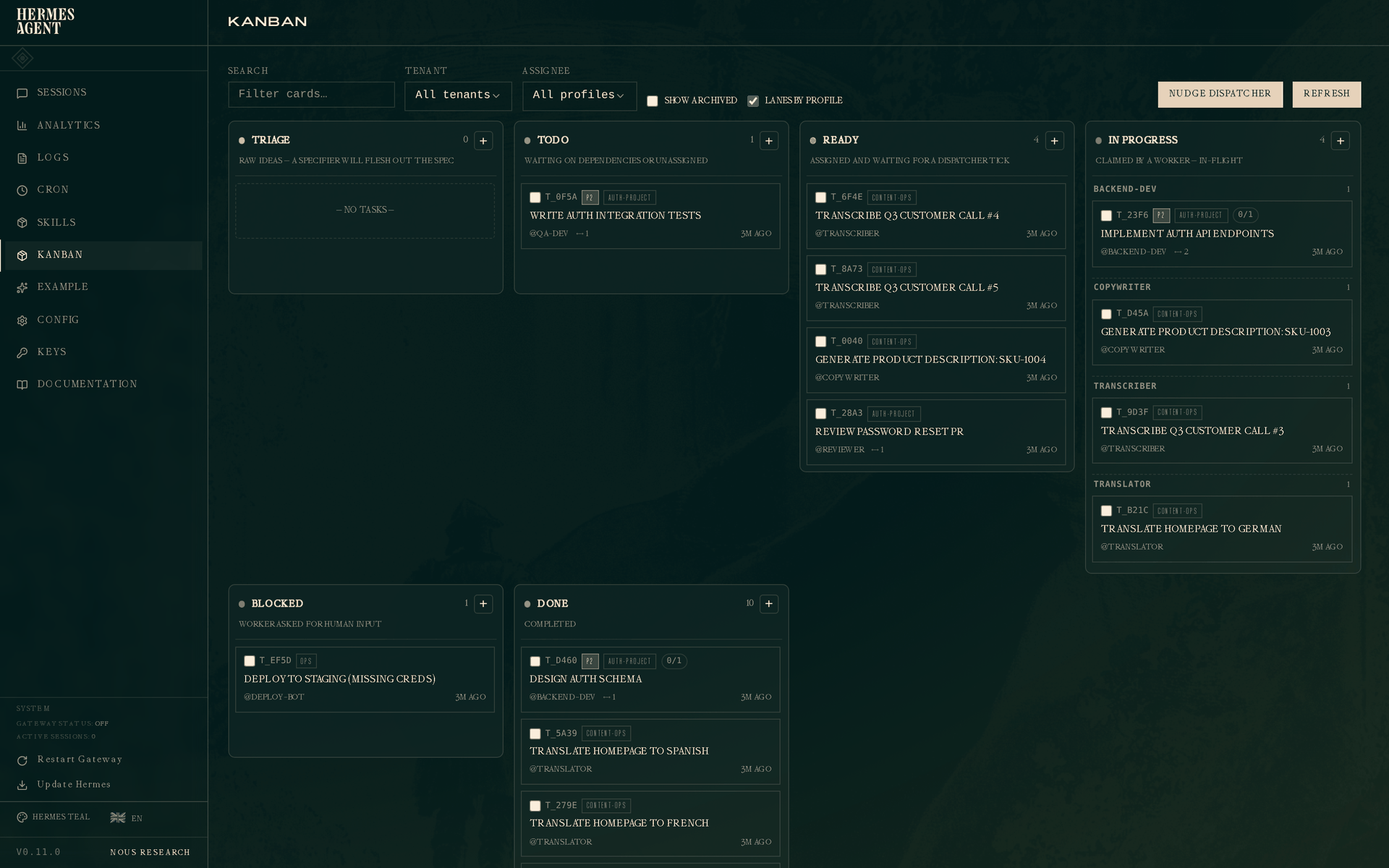
The six columns
The board reads left to right, and a task moves across it as it gets done:
- Triage is raw ideas you've just dropped in. Hermes can read the description and break a big one into smaller tasks routed to the right agent.
- Todo is created but waiting, either on another task to finish first or on being assigned.
- Ready is assigned and waiting for an agent to pick it up.
- In progress is an agent actively working. The column groups by agent, so you can see at a glance what each one is doing.
- Blocked is an agent that hit a wall and wants a human. It paused and asked rather than guessing.
- Done is finished, with a summary of what happened attached.
At the top there's a search box, filters, and a Nudge dispatcher button that runs one round of work right now instead of waiting for the next sixty-second tick. Click any card and a panel opens on the right showing its full history.
What this looks like with my agents
Here's a real flow. I ask my strategy agent for a plan for next month. Part of that plan is three LinkedIn posts. Strategy doesn't write posts, that's the content agent's job. So instead of me copying the brief into the content bot's chat, strategy puts a task on the board and assigns it.
From the terminal that command looks like this:
hermes kanban create "Draft 3 LinkedIn posts for June theme" \
    --assignee content \
    --body "Three posts on the June content theme. My voice, UK English, no banned words. One sharp idea each."
On the next tick the dispatcher spawns my content agent in the background as a worker. It reads the task, writes the posts, and closes it with a short summary of what it did. The drafts come back attached to the card. I never touched the content bot directly.
You can chain tasks too. Give one task another as its parent and the second won't start until the first is done. So "pull this month's pipeline" (CRM) can feed "write the follow-up emails" (content), and Hermes holds the second task back until the CRM agent has finished and handed over its result. The handover is the clever part: when the content agent picks up, it can see the CRM agent's summary, so it has the context without me re-explaining anything.
When an agent gets stuck
Agents fail sometimes. A missing API key, a task that's too vague, a job that errors out. The board handles this instead of spinning forever. After a couple of failed attempts a task moves to Blocked with the reason written on it, and stops. Nothing retries endlessly burning tokens.
You read the reason, fix the cause, and unblock it:
hermes kanban unblock <task-id>
It goes back to Ready and an agent picks it up again on the next tick. And because every attempt is logged, the agent on the second try can see why the first one failed and avoid the same mistake.
If you've got Telegram wired in, you can get a ping when a specific task finishes or gives up, so you don't have to sit watching the board:
hermes kanban notify-subscribe <task-id> --platform telegram --chat-id <your-id>
A word of advice on the board
Wire this up last. Get each agent genuinely good on its own first, talking to it directly for a week or two, before you connect them through the board. A shared queue between three weak agents just spreads the weakness around. Three sharp agents with a board between them is when it starts to feel like a team.
One cost note too: every task the board runs is a full agent session, so it costs tokens like any other. For something small and frequent, a simple scheduled job is often cheaper than a board task. Use the board for real work that crosses between agents, not for everything.
The cost question nobody mentions
Three agents means three times the potential model calls. If all three are hitting a top-tier model for every message, the bill climbs faster than you'd expect. This is the part most setup guides skip.
A few things that keep it sane.
Match the model to the job. Hermes lets you set a different model per profile, and you set this during setup or in each profile's config. My CRM agent does simple lookups and doesn't need a frontier model. My strategy agent does, so it gets the expensive one. Don't pay for horsepower an agent never uses.
Point background tasks at a cheaper model. Hermes uses your main model by default for housekeeping jobs like summarising and naming sessions. Those don't need a top model. Override them in each profile's config and route them to something cheap. It's one of the quickest savings you'll make.
Be careful with automation. An agent firing scheduled tasks on an expensive model every hour will quietly drain your budget. Start with manual triggers. Only automate once you know a task works and you've seen what one run costs.
Running three agents on a sensible budget is completely doable. It just asks for a bit more intention than running one.
Start smaller than you think
If I did it again, I'd build one extra agent, not five. Getting an agent's skills and instructions right takes more thought than spinning up a profile, and a rushed one gives you a flat agent that doesn't feel different from the others.
Pick the one job your current agent is worst at. For me that was writing, because the strategy context kept leaking into the tone. Build a dedicated agent for that one job, get it genuinely good, then add the next. The profiles take two minutes. The personalities take a week of actually talking to them.
If you're already running Hermes and you've felt that averaged-out blandness creep in, this is the upgrade. One server, a handful of focused agents, each one sharp at its own thing.
If you want help thinking through which agents are worth building for your own work, or you're setting up something like this and want a second pair of eyes, message me and I'll tell you honestly whether it's worth it. I run 1:1 sessions on exactly this kind of practical AI setup.
Further reading: if you're newer to self-hosted agents, start with my guide to getting your first Hermes agent running on a VPS before you go multi-agent.
Related Articles
Claude models compared 2026: Fable, Opus, Sonnet, Haiku
The Claude models compared for 2026: what Fable 5.1, Opus 5, Sonnet 5 and Haiku 4.5 each do best, wh...
Hermes Agent Bot Mode: how I run a fleet of AI bots
Hermes Agent bot mode: seven AI bots that research, draft and review each other's work, and why none...

How I set up Grok Bot (and what I use it for)
How I set up Grok Bot: a Chief of Staff bot, three specialists, a weekly cadence, and a hard human g...

How I Rank on Google Using Claude Cowork
I'm not an SEO expert. Here's the Claude Cowork workflow Claude and I built to rank on Google — and ...